
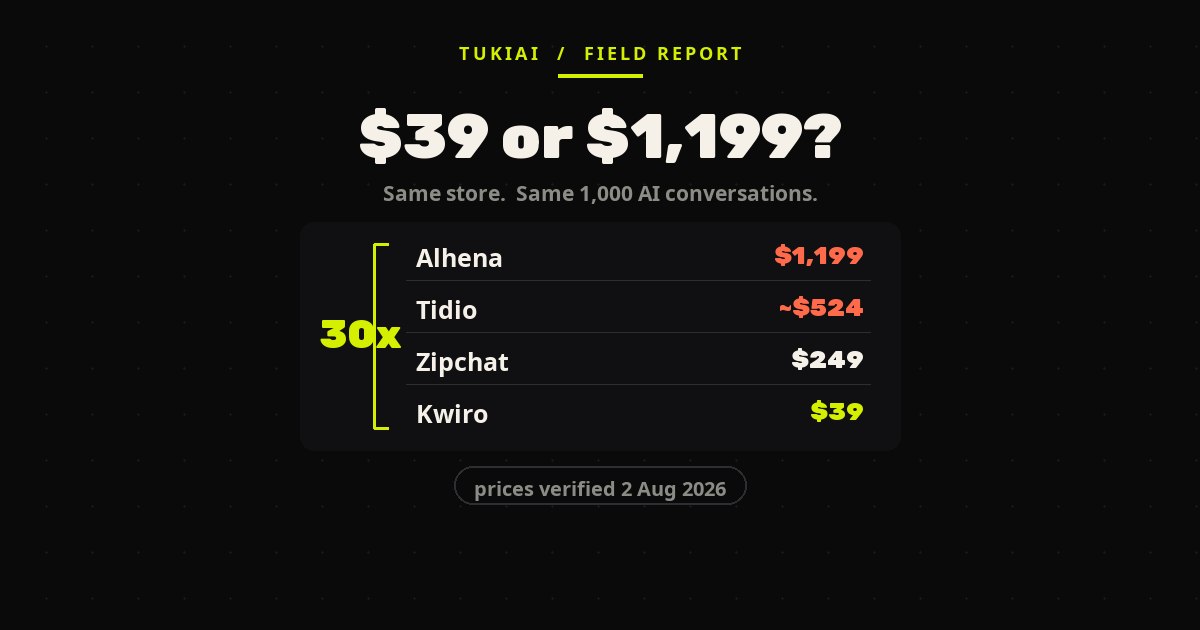
An AI chatbot for WooCommerce can cost $39 a month or $1,199 — for the same store, handling the same 1,000 conversations. Eight tools, priced against each other properly. Nobody publishes that comparison, so here it is: every price fetched from the vendor’s own pricing page on 2 August 2026, with the arithmetic shown.
The first thing that broke on my store wasn’t the AI. It was a 403.
It wasn’t even the chat widget — it was a quote request form. I’m telling you about it anyway, because it is precisely the failure that kills chat widgets, and I only understood that after I’d fixed it.
Logged in, everything worked. Logged out — which is to say, every actual customer — the form just sat there. No error a visitor could see. It took me longer than I want to admit to find it: the full-page cache was serving a saved copy of the page with a WordPress security token baked into the HTML. The token expires in hours. The cached page doesn’t. So every visitor got handed a dead credential and the request died silently.
That bug has nothing to do with how clever the model is. It’s plumbing. And it’s the reason I stopped reading feature tables when evaluating an AI chatbot for WooCommerce, and started reading changelogs and billing units instead.
The number that should decide this, and never appears anywhere
Every “best chatbot” article compares features. Almost none of them answer the only question a store owner actually has: if I run an AI chatbot for WooCommerce at my volume, what is the monthly bill?
So I worked it out. One scenario — 1,000 AI-handled customer conversations in a month, which is a busy-but-ordinary small store — priced against each vendor’s published rates.
The spread is roughly 30× between the cheapest and the dearest, for the same volume of the same work. That is not a quality gradient. Nothing in the top half is thirty times better than the bottom half. It is a pricing-model gradient, and it is almost entirely invisible when you are looking at a comparison table of checkmarks.
Be careful with these figures — they are my computed estimates from published rates, not quotes anyone gave me. Two of them depend on an assumption I had to make myself, and I’ve flagged which below, because that assumption is exactly where a budget goes wrong.
Four different billing units wearing the same word
Here is why the comparison tables fail. These tools do not charge for the same thing. They all say “conversations” in their marketing and then bill four incompatible ways:
Per conversation. Kwiro, Tidio and Alhena. You pay per customer thread, resolved or not. Tidio’s AI agent page advertises $0.50 per conversation; its own entry bundle is $32.50 for 50, which works out to $0.65. Both numbers are on Tidio’s site. I could not get the full price ladder to render — it sits behind a JavaScript calculator — so the true cost of a 1,000-conversation bundle there is genuinely unknown to me, and I’d rather say that than guess.
Per reply. StoreAgent and Zipchat. This is the one that catches people. A conversation is not a reply — it’s several. Zipchat is transparent about the ratio: its Growth plan bundles ~600 conversations and 1,500 replies, implying 2.5 replies each. StoreAgent publishes no ratio at all, so my $49 figure assumes 5 replies per conversation. If your customers are chattier than that, StoreAgent jumps from $49 to $249, and nothing on the pricing page warns you.
Per outcome. Intercom’s Fin, at $0.99 each. This is the fairest-sounding model and the hardest to budget, because your bill is a function of how often the AI succeeds. At a 50% resolution rate, 1,000 conversations costs about $524 with one seat. At 100%, it’s $1,019. Intercom publishes no resolution-rate figure — the 50% I used is my own illustration. (Tidio publishes a 50% guarantee. That’s Tidio’s number, not Intercom’s, and transferring it would be sloppy.) One detail worth knowing: Fin bills “qualifications” at $9.99, ten times a normal outcome.
Flat band. Octocom charges $200/month for anything between 250 and 5,000 conversations. At 1,000 you’re overpaying against Kwiro by 5×; at 4,500 you’re the best-priced option on the list. Banded pricing is a bet on your own growth.
And then there’s the fifth model, which isn’t really pricing at all: WPBot and WoowBot sell a licence — $39/year, about $3.25 a month — and run the AI on your OpenAI or Gemini key. The licence is the cheapest number in this entire article and it is also meaningless on its own, because the vendor publishes no token cost. Whatever the AI actually costs, it lands on a different invoice. Any article that ranks WPBot as “cheapest” without saying that is misleading you.
What WordPress.org tells you that the pricing page won’t
Pricing pages are marketing. The plugin repository is a public record, and it’s the fastest trust check available to a WooCommerce merchant. Occasionally the cheapest option turns out to be core itself — WooCommerce 11.1 bundles a withdrawal form that used to require a paid plugin, though what it actually does is narrower than the plugins it replaces.
| Plugin | Active installs | Rating | Ratings | Last updated | Tested to |
|---|---|---|---|---|---|
| Tidio | 80,000+ | 4.7 | 396 | 16 Jun 2026 | WP 7.0.2 |
| Intercom | 6,000+ | 3.4 | 11 | 16 Apr 2025 | WP 6.7.5 |
| WPBot | 5,000+ | 4.7 | 122 | 29 Jul 2026 | WP 7.0.2 |
| WoowBot | 900+ | 4.8 | 19 | 29 Jul 2026 | WP 7.0.2 |
| StoreAgent | 500+ | 5.0 | 5 | 30 Jul 2026 | WP 7.0.2 |
| Zipchat | 40+ | — | 0 | 22 Jul 2026 | WP 7.0.2 |
| Kwiro | <10 | — | 0 | 26 Jul 2026 | WP 7.0.2 |
| Octocom | No WordPress.org listing | ||||
| Alhena | No plugin at all — connects via the WooCommerce REST API | ||||
Three things fall out of that table, and the biggest company on it comes off worst.
Intercom’s WordPress plugin was last updated in April 2025. It’s tested to WordPress 6.7.5 while the current release is 7.0.2, and the repository displays its official warning that the plugin hasn’t been tested with the last three major releases and may no longer be maintained. Eleven ratings, 3.4 stars. You can absolutely run Fin on a WooCommerce store — but the WordPress-native path to it has been sitting untouched for over a year.
At the other end, StoreAgent’s perfect 5.0 rests on five reviews. Zipchat and Kwiro have zero. That isn’t a criticism of the software; it’s a statement about how much you can infer from the score, which is nothing. A five-star average from five people is noise wearing a badge.
And a missing listing isn’t automatically bad. Alhena has no plugin on purpose — it authenticates against your store’s REST API instead, which the vendor argues means no PHP added to your site and no plugin conflicts. That’s a real architectural choice with a real trade-off it doesn’t advertise: the read load moves onto your store’s API instead of disappearing.
The WooCommerce-specific things that actually break
This is where the generic “best AI chatbot” lists are useless, because none of these failures are visible in a feature matrix. An AI chatbot for WooCommerce lives inside someone else’s plugin stack, cache layer and order backend — and that is where it breaks.
Full-page caching versus REST security tokens. My 403, and the reason a form taught me something about chat widgets. StoreAgent’s changelog documents the identical bug and its fix — “Cookie check failed (403) from stale REST nonce baked into cached pages” — and there’s a long-running WooCommerce core issue plus repository support threads on the same thing with LiteSpeed Cache, WP Super Cache and W3 Total Cache. It affects any chat widget that authenticates over the REST API with a cookie token, which is most of them. StoreAgent isn’t unusually buggy here. It’s the only one that wrote the fix down in public.
Variable products. The same changelog fixed variable-product pricing twice in consecutive releases — once so the bot could read variation prices when the parent price is empty, once so it stopped quoting the wrong price in coupon offers. Empty parent price on a variable product is a completely normal WooCommerce configuration and it is where a lot of AI chatbots quietly give a customer a wrong number.
HPOS. WooCommerce’s High-Performance Order Storage has been the recommended order backend for a while. Exactly one plugin on this list — Kwiro — declares compatibility with it and Block Checkout in its changelog. For Tidio, WPBot, WoowBot, Zipchat and StoreAgent I could not find an HPOS declaration anywhere. Absence of a statement is not proof of a problem, but a plugin that touches orders without declaring HPOS is what triggers WooCommerce’s own incompatibility notice in your admin.
Script weight. There’s a public support thread where a merchant measured Tidio adding 600KB to their page load and Tidio’s staff replied that the widget weighs around 250KB and loads asynchronously. Neither figure is independently verified and I’m not going to pick a winner. What’s instructive is the resolution: the merchant fixed it by delaying the script by five seconds through their cache plugin. No vendor here ships delayed loading by default.
Right-to-left. I care about this more than most people because my store is Hebrew. Replying in Hebrew and rendering a right-to-left widget correctly are two entirely different capabilities, and vendors blur them constantly. Zipchat advertises 95+ languages; Kwiro advertises 58 including Arabic. Those are statements about what the model writes back. Only WPBot makes an explicit RTL claim about the interface itself. For Tidio, Intercom, StoreAgent, Octocom and Alhena I found no RTL statement at all.
Five checks before you install an AI chatbot for WooCommerce
This is the whole article compressed into something you can run in twenty minutes.
- Find the billing unit, then convert it to your own volume. Not the plan name — the unit. Conversation, reply, outcome, or band. If the vendor bills per reply and won’t tell you the replies-per-conversation ratio, that’s your answer about how the relationship will go.
- Open the WordPress.org listing before the pricing page. Last-updated date, tested-up-to version, and how many ratings the score is built on. A stale plugin on a live store is a security decision, not a feature decision.
- Search the changelog for “nonce”, “cache”, and “variable”. A vendor who has fixed those has met a real WooCommerce store. A vendor with no such entries either hasn’t, or doesn’t publish.
- Test it logged out, on a cached page, twice. Once immediately, once the next day. The nonce bug only appears on the second visit, which is why it survives every demo.
- Ask it the price of a variable product that has no parent price. Then check the answer against the product page. This single question separates a bot reading your live catalogue from a bot reading a summary of it.
Check five is the one I’d keep if I could only keep one. A chatbot that invents a price doesn’t cost you a support ticket, it costs you the order and the trust. We published the stock-and-price test we run against our own agent for exactly this reason, and the method works on any vendor.
How my 403 ended
The fix was mundane: stop trusting a token baked into cached HTML, and fetch a fresh one at request time instead. Ten minutes of work once I understood it, two days of confusion before that.
What stayed with me was the shape of the failure. Everything I could see was fine. Logged in, the form worked perfectly. The store’s own analytics showed the page serving normally. The only people experiencing the bug were the people I’d never hear from — visitors who saw a form that didn’t submit and left.
Which is why I brought a form into an article about chatbots. A chat widget authenticates the same way, sits on the same cached pages, and fails the same silently — except a chat widget fails while looking completely normal. There is no error state. It just becomes a box that doesn’t answer, and every visitor who meets it concludes your AI is useless rather than that your cache is misconfigured.
That’s the real risk with this category. Not that you pick the wrong vendor — that you pick a reasonable one, it half-works, and you quietly write off the whole idea.
Run this on us too
We build one of these. TukiAI is an AI agent for WooCommerce, so read everything above with that in mind — I’m not a neutral reviewer and there’s no version of this article where I am.
Which is why the useful part isn’t the ranking, it’s the five checks. Run them on us. Ask our agent for the price of a variable product with an empty parent price and see whether it reads your live catalogue or improvises. Open our install guide and see whether the plumbing is documented or hand-waved. If you want the head-to-head we published against the two biggest names here, it’s here — written by us, so apply the same discount.
The tests are the useful part. The vendor is incidental.
If you want the mechanism behind context limits rather than the invoice, see why Character.AI forgets, and what actually makes it remember.
WooCommerce has since started closing one slice of this gap itself: version 11.0 added a built-in recovery email. We read the code to see what it really sends in the WooCommerce abandoned cart email and its block checkout trap.
Sources
- Pricing pages, all fetched 2 August 2026: Tidio · Tidio AI agent · Intercom Fin · WPBot · StoreAgent · Zipchat · Kwiro · Octocom · Alhena
- WordPress.org plugin listings and changelogs, fetched 2 August 2026: Tidio · Intercom · WPBot · WoowBot · StoreAgent · Zipchat · Kwiro
- REST nonce and full-page cache: WooCommerce core issue #25437 and the WordPress.org support thread
- Script weight discussion: WordPress.org support thread
- Alhena’s plugin-free architecture, in the vendor’s own words: Alhena blog
All prices are as published by each vendor on 2 August 2026 and exclude VAT. Monthly totals at 1,000 conversations are computed by me from those published rates and are not quotes. Where a vendor’s billing unit is not a conversation, the conversion assumption is stated in the text and is mine, not theirs.
Related: pricing is one half of the decision; readiness is the other. ACP and UCP are still “coming soon” for WooCommerce while MCP is already live — here is what that actually means for your store.