For years the answer to “does WooCommerce send abandoned cart emails?” was a flat no, and every guide on the web still says so. That changed on 4 August 2026. WooCommerce 11.0 ships a WooCommerce abandoned cart email in core — no plugin, no subscription. It is off by default, it is labelled experimental, and on a large share of stores it will never send a single message.
That last part is not a bug report from a forum. It is written into WooCommerce’s own source code, in a comment the team left for themselves. This guide is built by reading that source — WooCommerce 11.0.1, the current release — rather than the release notes, because the release notes do not mention the limitation at all.
The short answer. On the classic checkout, turn it on — it is a free win. On the block checkout, which is the default for stores built in the last couple of years, the automated email never fires, so turning it on changes nothing. Either way, do not cancel a recovery tool you are paying for. The rest of this guide is the evidence, and how to tell which case you are in.
What WooCommerce 11 actually shipped
Two files do the work: src/Internal/AbandonedCartRecovery/Scheduler.php decides when a message is queued, and includes/emails/class-wc-email-customer-abandoned-cart-recovery.php decides what goes out. The feature is hidden behind an experimental flag, so nothing happens on your store until you switch it on at WooCommerce → Settings → Advanced → Features, then enable the email itself under Settings → Emails.
Turning it on is genuinely free, and for a lot of stores it is worth doing. But before you cancel anything you are currently paying for, it is worth knowing precisely what you are getting, because the gap between “WooCommerce recovers abandoned carts now” and what the code does is wide.
What the WooCommerce abandoned cart email actually sends
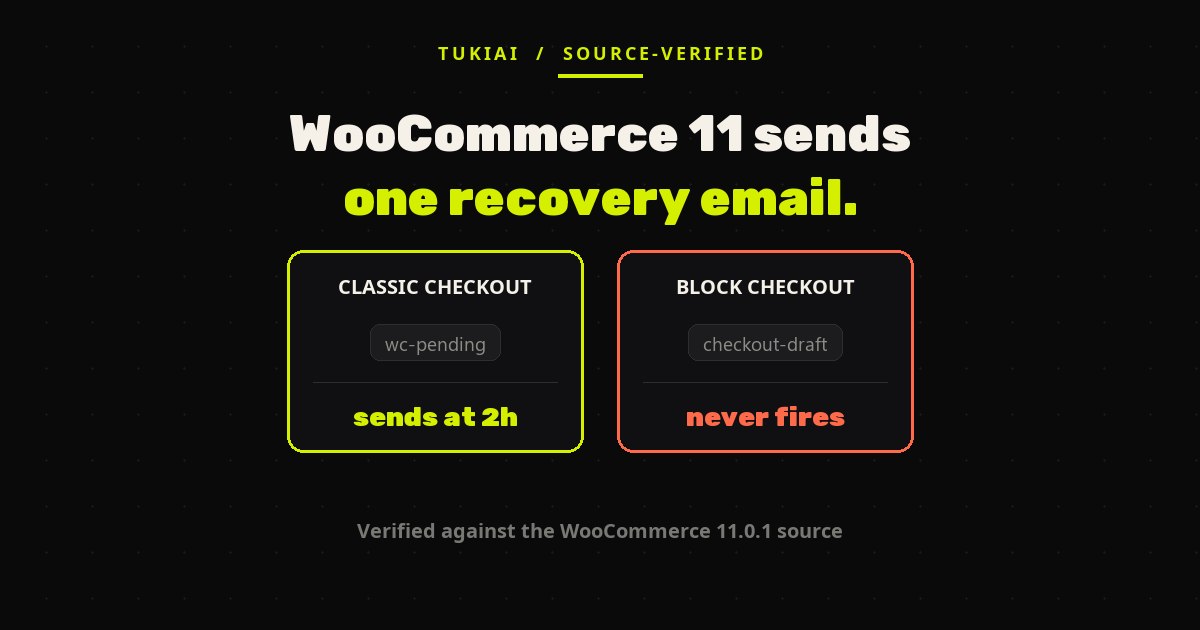
One email. Once. Two hours after the order record is created.
The delay is a fixed constant in the email class — AUTO_SEND_DELAY_SECONDS = 2 * HOUR_IN_SECONDS — and there is no admin field to change it. A separate constant, ABANDONMENT_THRESHOLD_SECONDS = HOUR_IN_SECONDS, sets a shorter one-hour floor that governs the manual send available from the order edit screen, so a merchant watching the orders list can intervene earlier by hand.
There is no second touch, no escalating sequence, no discount code, and no “your cart expires tonight” urgency. The recovery link is simply the order’s existing pay endpoint — not a signed, single-use URL with an expiry. The source is candid about that too, noting that a future iteration may swap it for one. In practice it means the link keeps working and can be forwarded, which matters if you were planning to attach a coupon to it.
Read plainly, this is a competent first version of one email, not a recovery system. Judged as “a free replacement for the reminder I never had”, it is a clear win. Judged as “a free replacement for AutomateWoo”, it is not close.
The block checkout trap
Here is the finding that changes the decision, and it is the reason this guide exists.
The automated scheduler only queues a send for orders in a specific status. Its default list contains exactly one entry: pending. You can see it in get_eligible_statuses(), which returns array( OrderStatus::PENDING ).
The problem is that the block checkout — the newer, default checkout for stores built in the last couple of years — does not create orders in pending. It creates them in checkout-draft the moment a shopper lands on the checkout page, and leaves them there until the order is actually submitted. WooCommerce documents this status behaviour openly; it exists so that half-filled checkouts do not pollute your real order list.
Put those two facts together and the automated email never fires on a block-checkout store. WooCommerce’s own code comment says so directly:
Store API orders are generally created in
checkout-draft, which is not scheduled yet.store-apiis listed here for future block checkout support.— comment in
Scheduler.php, WooCommerce 11.0.1
“Not scheduled yet” is the whole story. Block checkout support is planned, not shipped.
Why the order status decides everything
The manual path behaves differently, which is worth knowing because it is easy to test the feature by hand, see an email arrive, and conclude the automation works. The email class keeps a second list, ABANDONED_STATUSES, that includes both pending and checkout-draft. That list governs the manual send button and the trigger-level gate — so on a block-checkout store you can send a recovery email by hand from the order screen, and it will go out.
Only the automated scheduler is restricted to pending. A hand test therefore passes on a store where the automation is doing nothing at all. If you check this feature by clicking the button once, you will get the wrong answer.
How to tell which checkout you are running
Open your checkout page in the editor. If you see a block called Checkout with inner blocks for contact, shipping and payment, you are on the block checkout. If the page contains only the [woocommerce_checkout] shortcode, you are on the classic checkout.
The faster check is the orders list. Filter to Drafts in WooCommerce → Orders: if a steady trickle of draft orders is accumulating there, your store is producing checkout-draft records and the built-in automation is skipping every one of them.
The workaround, and why it is not supported
The eligible-status list is filterable. Adding checkout-draft to it is a few lines:
add_filter(
    'woocommerce_abandoned_cart_recovery_eligible_statuses',
    function ( $statuses ) {
        $statuses[] = 'checkout-draft';
        return $statuses;
    }
);
Two honest warnings before you paste that in. First, core calls this path “not scheduled yet” — you are enabling something the team has not finished, so expect the behaviour to change under you in a future release. Second, a checkout-draft order is created when the shopper arrives at checkout, which means many of them have no billing email captured yet; in that case the send simply no-ops. You will not email a stranger, but you will not recover them either. Test it on a staging copy before you trust it.
It only knows about AutomateWoo and MailPoet
WooCommerce tries to avoid double-emailing your customers, and it does this with a hardcoded list. KNOWN_RECOVERY_HANDLERS contains two entries: AutomateWoo and MailPoet. The source describes the check as install-only — it looks at whether the plugin is installed, not at whether that plugin is actually configured to recover carts.
Both halves of that matter. If you run AutomateWoo but have never built a recovery workflow in it, core may stand down for a competitor that is not competing. And if you run any of the other popular recovery tools — CartFlows, Retainful, Omnisend, FunnelKit, Abandoned Cart Lite — core does not recognise them at all, and your customer can receive two reminder emails about the same order. There is a filter, woocommerce_abandoned_cart_recovery_suppress, that plugins can use to opt out, but that requires the plugin author to have shipped support for a feature that is three weeks old.
If you enable this alongside an existing recovery tool, send yourself a test order first.
An abandoned checkout is not an abandoned cart
The naming invites a misunderstanding worth spelling out. This feature recovers abandoned checkouts: an order record already exists, which means the shopper reached the checkout and got far enough for WooCommerce to save something. It does nothing about the much larger group who fill a basket, browse for ten minutes and close the tab — no order, no email address, no message.
The scale of the difference is the whole business case. Baymard Institute’s meta-analysis of 50 studies puts average documented cart abandonment at 70.22%, and their research on why people leave at checkout points overwhelmingly at things an email cannot fix after the fact: unexpected extra costs (40%), delivery too slow (20%), not trusting the site with card details (19%), being forced to create an account (18%).
A reminder two hours later does not answer any of those objections. It just asks again.
So should you drop your abandoned cart plugin?
Three cases, and the answer genuinely differs.
Classic checkout, no recovery tool today. Turn it on. It costs nothing, it works, and one reminder beats zero reminders. This is the clearest free win in WooCommerce 11.
Block checkout, no recovery tool today. Turning it on is harmless but will not do anything automatically. Do not tick the box and consider the problem solved — that is the trap this article is about. Either apply the filter above on staging, or keep looking.
Paying for a recovery tool today. Do not cancel it. On block checkout you would be trading a working sequence for nothing at all. Even on classic checkout you would be trading a multi-step sequence with discounts and expiring links for a single untimed reminder. The saving is real; so is the drop in recovered revenue, and it is almost certainly larger.
Whatever you decide, the test is the same one worth running on any tool that claims to recover sales: place a real order, abandon it, and time what arrives. We took the same measure-it-yourself approach to pricing in our breakdown of what an AI chatbot for WooCommerce actually costs, where the spread between comparable tools turned out to be 30x.
What a conversational agent does differently
A timed email and a conversation solve different halves of the problem, and it would be dishonest to present one as an upgrade of the other.
The email reaches someone who has already left. It is a second chance, and a cheap one. What it cannot do is address the reason they left, because by then nobody is there to ask. Look again at the Baymard reasons: most of them are questions that had an answer available at the moment they were asked — what does shipping cost, when does it arrive, do you have my size, can I return it. An agent that is present on the page can answer those before the tab closes; an email two hours later can only apologise for them.
The honest framing is that core’s email is a safety net and a conversational layer is a prevention layer, and a store that is losing 70% of its checkouts probably needs both. If you want to see how the conversational side is set up, our three-step install walkthrough covers it, and our comparison of WooCommerce AI sales and service agents covers the alternatives — including the ones that are not us. For where WooCommerce itself is heading with agent-driven checkout, see our read of what shipped in WooCommerce 10.7.
Quick answers
Does WooCommerce 11 send abandoned cart emails without a plugin?
Yes, as an experimental feature you enable manually. It sends one email two hours after the order is created, and only for orders in pending status.
Why is my WooCommerce abandoned cart email not sending?
The most likely cause is the block checkout. Those orders are saved as checkout-draft, and the automated scheduler only queues orders in pending. Check whether draft orders are piling up in your orders list.
Can I change the two-hour delay?
Not from the admin. It is a constant in the email class. Changing it means overriding the scheduling in code.
Will it conflict with my existing abandoned cart plugin?
Possibly. Core only detects AutomateWoo and MailPoet, and only by whether they are installed. Any other recovery plugin can produce a duplicate email.
Does it recover carts where the shopper never reached checkout?
No. It requires an order record, so it only covers abandoned checkouts, not abandoned carts.
Is it safe to use on a live store?
On classic checkout, yes — it is a single transactional-style email. Send yourself a test order first if you run any other recovery tool.
How this guide was verified
Every behavioural claim here was read directly out of the WooCommerce 11.0.1 plugin source downloaded from WordPress.org — the constants, the status lists, the filter names and the code comment quoted above. None of it comes from a summary or a secondary article, which matters this time: at the time of writing, the top search results for this question all still state that WooCommerce has no built-in abandoned cart email, which was true until 4 August 2026 and is now wrong.
If a later WooCommerce release adds block checkout support to the scheduler, the central limitation here disappears. This guide reflects 11.0.1, and will be updated when that changes. The same reading pays off on the next release: WooCommerce 11.1 adds a built-in withdrawal form, and its 14-day check counts from the order date rather than from delivery.
Sources
- WooCommerce 11.0.1 plugin source,
src/Internal/AbandonedCartRecovery/Scheduler.phpandincludes/emails/class-wc-email-customer-abandoned-cart-recovery.php(downloaded from WordPress.org). - WooCommerce 11.0 release notes, WooCommerce Developer Blog, 4 August 2026.
- Order Statuses documentation, WooCommerce — on block checkout and the draft status.
- Cart Abandonment Rate Statistics, Baymard Institute — meta-analysis of 50 studies; 70.22% average, and the checkout-reason breakdown.